The Live Slideshow Is Live
Glint now puts your guests' photos on the biggest screen in the room. Open the link on a smart TV, or on a laptop plugged into the projector, and it fills the screen and runs itself for the rest of the night.
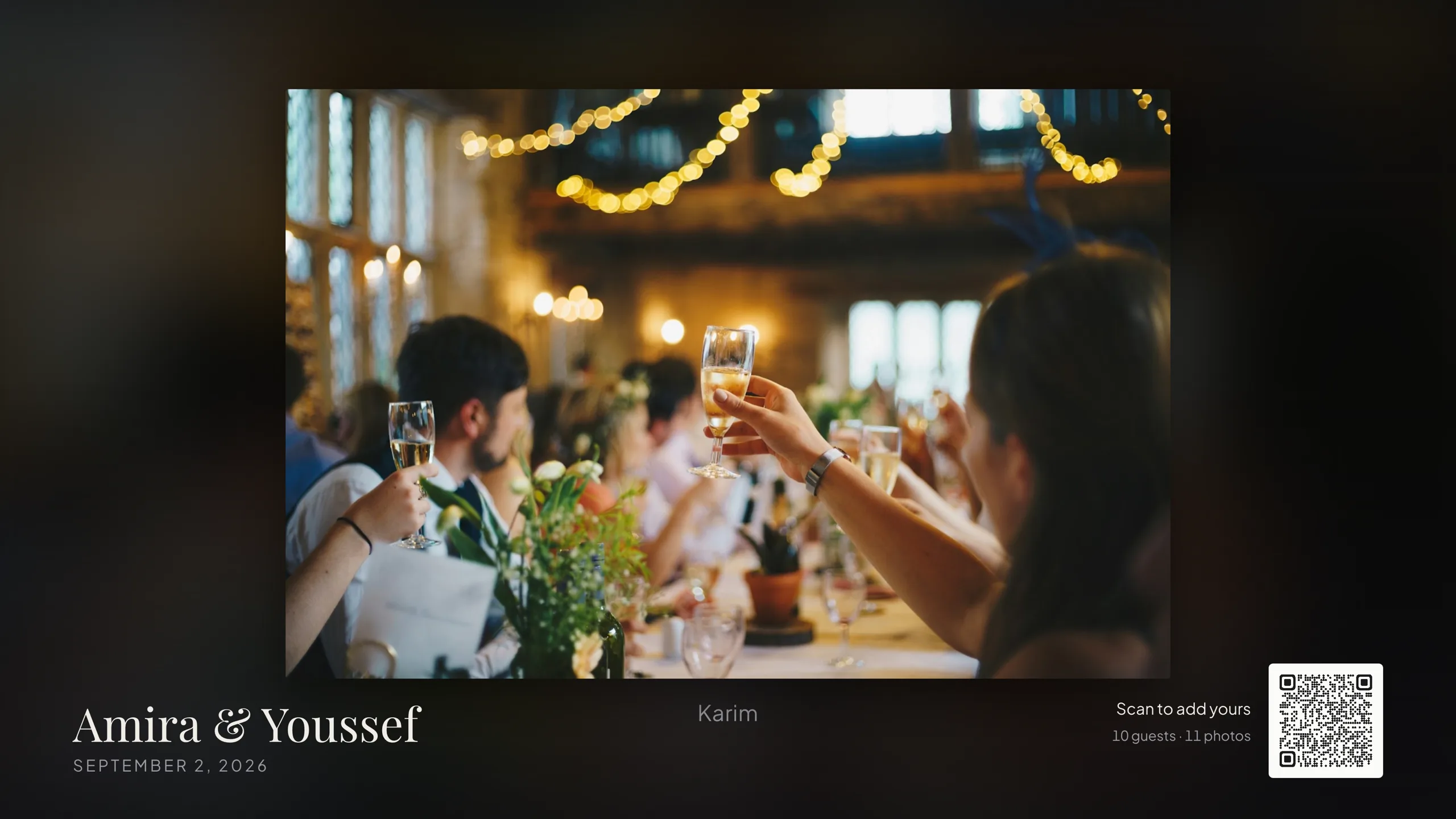
What is there
A photo reaches the screen about twenty seconds after the guest who took it finishes uploading, while photos are flowing; once the screen has been quiet for a while it checks less often, so a photo landing in a lull can take up to a minute or so. Each one holds for eight seconds by default, and you can switch that to five or twelve with one tap. Videos hold half again as long as photos, and a guest's written message a little longer than a glance, so you set one number and the rest follows from it.
It shows everything before it repeats anything, gives a new arrival priority so the person who just uploaded sees their photo quickly, and avoids putting the same guest's pictures back to back. It has its own link and its own switch, so closing your gallery does not close it, and starting it does not open your gallery.
Why it took the shape it did
Every serious competitor has a photo wall. Building one buys parity and nothing else, so the question was what a wall could do that a screensaver does not.
The complaint that comes up more than any other in this category, from hosts and from vendors' own help pages, is that guests simply do not participate. Everyone sells "scan to upload" and then, when the room does not, treats it as the room's fault. We wanted the screen to be the thing that fixes it rather than another surface that assumes the problem away.
That turns out to be mostly geometry. A QR code scans reliably from roughly ten times its own width. To be scanned from five metres, a code needs to be about fifty centimetres across, which on a 55-inch television is more than a third of the screen. The tasteful little code in the corner that every wall puts there, ours included, is about eight centimetres across on that screen, and it works from about eighty centimetres and nowhere else. It is decoration. Everybody past the first table is looking at a code they cannot use.
So the slideshow keeps the corner code for anyone walking past, with the running count of guests and photos beside it, and every so often gives the code a full screen of its own, under the event name and above the link written out in full. At full screen the code is about twenty centimetres across on that television, so about two metres: the nearest tables rather than the whole room. On a projector the same slide is much bigger, about forty centimetres, so about four metres, which is most of the room. That is honest rather than triumphant, and it is still the difference between a code one table can use and a code several can. How often it does that depends on the room: when nothing has been uploaded for a while it asks more often, and when photos are already flowing it gets out of the way. A fixed interval would be nagging at a busy party and useless at a quiet one.
The other thing worth saying is what the wall does not do. There is no Ken Burns setting to fiddle with, no side rails of thumbnails, no separate duration for every kind of media. We built some of that and took it out again. Nobody is standing at the projector adjusting it during the speeches, and every extra control was one more thing to get wrong before the doors opened.
The parts you decide
Five settings, and they reach a screen that is already running in about twenty seconds, or a minute or so in a lull, so you can change your mind from your phone during the meal without restarting anything. Photos only, if the videos are not for a crowd. How long each photo holds. Whether videos play to their end or cut at their slot. Whether the small code sits in the corner over the photos, though the full-screen join slide carries its code either way. Whether guests' names and messages appear under their photos.
If something goes up that should not, hide it from your dashboard and it leaves the screen within about twenty seconds, or a minute or so if the screen has been quiet. The gallery is a different shape: it does not poll, so the item is gone for anyone who opens or reloads that page, while a guest who already has it open keeps seeing it until they refresh. The file stays in your Drive. Hiding is about what the room sees, not about what you keep, and it costs nothing extra, which we mention only because it is often the thing held back for a higher tier.
It is an Event Pass feature, and like the gallery it is off until you start it. A screen that switches itself on is not a gift either.
Glint
Collect every photo from your wedding
One link, one QR code. Your guests upload straight to your Google Drive, and every photograph is yours to keep.